
For authors
Vellum alternativeBook formatting that runs on Windows, not just a Mac
Vellum is a well-made formatter, but it only runs on a Mac. Familiar runs in your web browser, so you can turn a Word manuscript into a print-ready PDF and an EPUB on whichever computer you write on.
- Nothing to install
- Windows, Mac, Linux or Chromebook
- From $15 a month
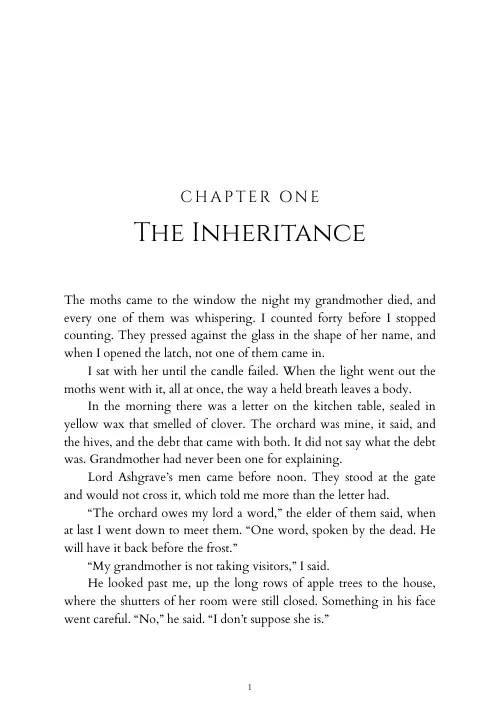
The Moth Orchard · Trade paperback
Fantasy template
Export · manuscript v5
Print PDFEPUB 3Proof PDFGalley DOCXFamiliar and Vellum at a glance
Vellum is a Mac app for formatting ebooks and print books, and plenty of indie authors swear by it. If you write on a Windows PC, the route Vellum’s own help pages suggest is to rent a Mac in the cloud and run Vellum over remote desktop.
Familiar is a different kind of tool: a web app where formatting is one part of a publishing platform. We make Familiar, so read this with that in mind. We have tried to be fair about where Vellum is the better pick.
- Runs on
- Familiar: A web browser on Windows, Mac, Linux or a Chromebook
- Vellum: Mac only, macOS 13 or newer
- On a Windows PC
- Familiar: Open it in your browser
- Vellum: Rent a remote Mac (Vellum’s help suggests MacinCloud)
- Price
- Familiar: Author plan, $15 a month or $150 a year. Publisher plans from $39 a month
- Vellum: One-time purchase: $199.99 for Vellum Ebooks, $249.99 for Vellum Press (ebooks and paperbacks)
- Updates
- Familiar: Included in the plan
- Vellum: Free
- Trying it first
- Familiar: No free tier
- Vellum: Free download; you pay when you generate files
- Manuscript import
- Familiar: Word (.docx), RTF or Markdown
- Vellum: Word (.docx)
- Ebook files
- Familiar: One EPUB 3, which Amazon accepts for Kindle
- Vellum: A file for each store (Kindle, Apple, Kobo), plus generic EPUB
- Print files
- Familiar: PDF/X-1a print PDF with optional bleed, checked by a print preflight
- Vellum: Print interior PDF, with Vellum Press
- Trim sizes
- Familiar: 35 presets, or a custom size
- Vellum: A built-in list, including mass market and large print sizes
- Designs
- Familiar: 21 templates, plus your own saved house templates
- Vellum: Dozens of built-in style options
- Fonts
- Familiar: 31 bundled, or upload your own .otf or .ttf files
- Vellum: Chosen from Vellum’s built-in print fonts
- For your editor
- Familiar: Proof PDF with line numbers, and an editable galley DOCX
- Vellum: Export the book’s content as a Word file
- Sharing
- Familiar: Unlimited logins on every plan
- Vellum: A license belongs to one person and can’t be shared
Last checked October 2026, against Vellum’s own website and help pages (listed under Sources below). Prices are in US dollars and exclude tax. Plans and features change, so confirm anything that matters to you on Vellum’s site.
Where Vellum is the better choice
Some writers are better served by it, and we would rather say so here than have you find out later.
You pay once
Vellum Press is $249.99 once, with free updates. That is about 17 months of Familiar’s Author plan billed monthly, or 20 months billed annually. If formatting is the only thing you need, Vellum costs less over a few years.
You can try everything before you buy
Vellum’s download is free. You can import your manuscript, try the styles and preview the book for as long as you like, and only pay when you generate the files. Familiar has no free tier.
A file for each store
Vellum generates separate ebook files for Kindle, Apple Books and Kobo, plus a generic EPUB for aggregators. Familiar makes one EPUB 3 for every store.
Box sets
Vellum has a guided workflow for combining several full books into one box set, each kept as its own volume. Familiar formats collections and anthologies, but has no box-set feature.
Where Familiar is different
Any computer, nothing to install
Familiar runs in the browser on Windows, Mac, Linux and Chromebooks. Your books live in your account, so you can start on a desktop and finish on a laptop. It does need an internet connection.
Print checks before you upload
The print PDF is PDF/X-1a, with bleed if you need it. A preflight checks page count, margins, gutter, embedded fonts and PDF/X before you download, and every one of the 35 trim sizes is marked with the printers that offer it. You can also set a custom size.
Your own fonts
Choose from 31 bundled fonts, or upload OpenType or TrueType files you have licensed. Uploaded fonts work in every template you save.
Proofs and revisions
Send your proofreader a PDF with numbered lines, so corrections come back as “page 112, line 9”. Each edition is pinned to a manuscript version, and shows when a newer manuscript is waiting.
Bring your editor or co-author
Every plan includes unlimited logins, so the people you work with get their own accounts instead of sharing yours, and nobody buys a second license.
More than formatting
The Author plan also includes an author page with links to every store, private ARC campaigns and monthly AI credits for manuscript evaluation.
Which one should you use?
Choose Vellum if
You write on a Mac, you would rather pay once than every month, and formatting is the only publishing tool you need. Vellum is good at what it does, and the free download lets you find out before you spend anything.
Choose Familiar if
You write on Windows or a Chromebook, you want to format from more than one computer, or you would use the author page, ARC campaigns and editorial tools that come in the same plan.
Moving a book from Vellum to Familiar
Export from Vellum
In Vellum, choose File, then Export Content As, then Word File. The file keeps your text, front and back matter and chapter structure.
Upload to Familiar
Add the Word file to a book. Familiar finds the chapters, scene breaks and front matter.
Pick a template and trim
Start from one of 21 templates, choose your trim size and adjust the design in the live preview.
Check and export
Run the print preflight, then download the print PDF and the EPUB.
Vellum’s Word export carries your content, not its styling, so you choose the design again in Familiar.
Familiar vs Vellum FAQ
More comparisons
Or see everything Familiar’s formatting does on the book formatting page.
Sources
What this page says about Vellum comes from these pages, last checked October 2026.
- Vellum homepage: platform requirements and prices
- Vellum Help: Purchasing FAQ (one-time purchase, updates, upgrades, refunds, Windows)
- Vellum Help: Using Vellum on Windows
- Vellum Help: Importing your manuscript
- Vellum Help: Generating books
- Vellum Help: Print overview
- Vellum Help: Trim sizes
- Vellum Help: Applying styles
- Vellum Help: Body text fonts
- Vellum Help: Creating a box set
- Vellum FAQ: Creating a Word file for your editor
Format your next book in the browser
Bring a Word manuscript and export a print PDF and an EPUB from the same design. Plans start at $15 a month, with formatting unlimited on every plan.