IngramSpark Sales Reports
How to find and download your IngramSpark sales data
IngramSpark provides detailed sales and publisher compensation reports for both print-on-demand and traditional printing. This guide explains how to find, download, and upload your IngramSpark reports to Familiar for automatic royalty calculation across your global distribution network.
Step-by-Step Guide for Ingram
Log into IngramSpark
Visit myaccount.ingramspark.com and sign in to your publisher account.
Access Reports Section
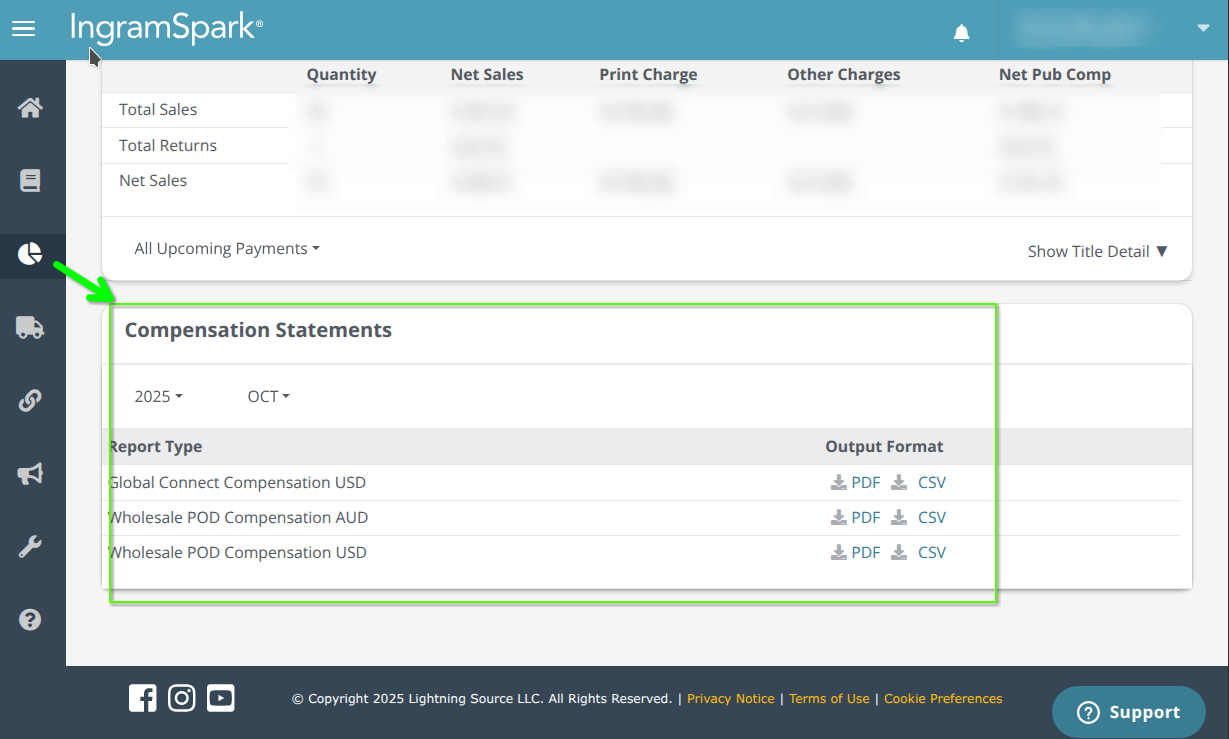
Navigate to the "Reports" section on the navigation bar and select "Compensation"
Select Sales Reports
Scroll to the bottom of the page to download your reports.
Step-by-Step For LightingSource Historical Data
Log into IngramSpark
Visit myaccount.ingramspark.com and sign in to your publisher account.
Access Reports Section
Navigate to the "Reports - Classic" section on the navigation bar and select "Publisher Compensation"
Select Sales Reports
Look for "Publisher Compensation Payments" reports. These contain your earnings data.
Choose Date Range
Select the month or date range for the sales data you want to export.
Download Report
Export the data as CSV or Excel format. Look for download or export options near the report display.
What's in Your IngramSpark Report
Included Data:
- • Book titles and ISBNs
- • Print and digital sales quantities
- • Wholesale and retail pricing
- • Publisher compensation amounts
- • Sales channels and markets
- • Return information
Report Types:
- • Monthly sales summaries
- • Detailed transaction reports
- • Publisher compensation statements
- • Global distribution data
Important Notes
Global Distribution
IngramSpark reports include sales from their global network of distributors and retailers, which may include international markets.
Payment Terms
IngramSpark typically processes payments monthly, with a 90-day payment cycle from the end of the sales month.
Print vs Digital
Reports may separate print-on-demand sales from traditional offset printing sales. Make sure to export both if you use multiple printing options.
Finding FX Rates for Payouts
For the most accurate royalty calculations, you'll need to find the exact FX rates used for your Ingram payouts.
Currency Fill Tool
Use our currency fill tool to get a baseline currency rate in place. However, for the highest accuracy possible, you'll need to find the exact FX rate used for your payout from Ingram.
Payment Timing
Ingram doesn't pay out sales for 30-90 days after sales happen. You'll know sales data before you're paid, so you'll need to wait for the actual payout to determine the correct FX rate.
Finding the Exact FX Rate
Ingram doesn't provide the exact FX rates they use for your payments. To get the closest possible rate:
- 1. Note the date of your payout from Ingram
- 2. Visit xe.com
- 3. Look up the FX rate for each currency/month pair listed on your FX page within Familiar using the payout date
- 4. Enter these rates into Familiar for the most accurate calculations
Need Additional Help?
IngramSpark Support
If you're having trouble accessing reports or understanding the data format, contact IngramSpark's publisher support team for assistance.
Data Formatting
IngramSpark reports typically export in Excel format. If you need CSV, most spreadsheet applications can convert the file format after download.